This post just provides some quick tips on creating desktop shortcuts for accessing the Preferences Pane (OS X) and Control Panel (Windows 7) options for selecting the startup disk on a Mac.
These aren’t single-click shortcuts that will initiate an automatic reboot into the other OS, though I may work on that later. These tips will just save a few clicks when preparing to boot into OS X or Windows on a Mac. I’ve been using this method for some time.
Creating a Startup Disk Alias in OS X
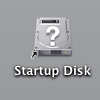
- In the Finder go to your primary OS X drive
- Navigate to System -> Library -> PreferencePanes
- Select StartupDisk.prefPane
- Click and drag to the Desktop while holding Cmd + Option
- Rename the alias, if desired
Creating a Desktop Shortcut in Windows 7

- Open Control Panel
- Click on System and Security
- Right-Click on Boot Camp
- Select Create Shortcut from the context menu


 Press Any Key
Leave a comment