A couple of months ago I had the idea to see if there was a simple way to play iTunes music from the built-in iMac speakers while also playing it through a Bluetooth speaker (in this case a JBL speaker). My goal was to have the music playing from the computer in one room and also playing from a Bluetooth speaker in the dining room. Sure enough, OS X has a way to do this (I’m running 10.9 so I don’t know how widely this feature is supported across older versions of OS X).

Thanks to user Eric Ross in the Apple Support Communities I didn’t have to do much searching to find the answer. As detailed in his response, the solution is to open the Audio Midi Setup application located in the Utilities folder and then simply create a Multi-Output Device that has both speaker types selected. Note that in order for this to work the Bluetooth speaker needs to already be connected to the Mac.
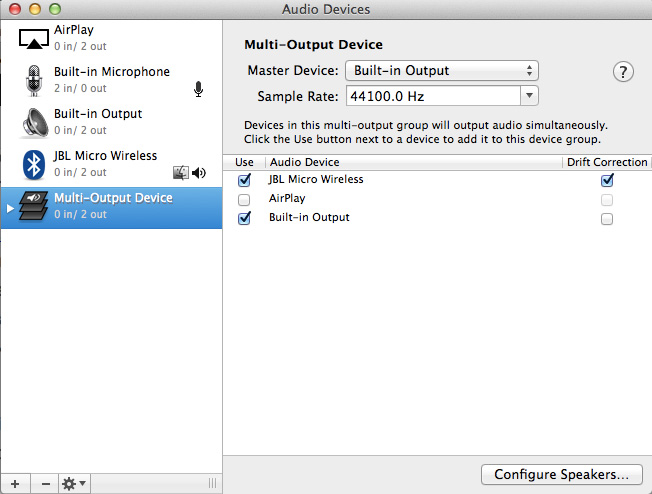
MOD-Setup

At this point we’ve only created the multi-output device. One additional step is required – setting it as the current output device (System Preferences -> Sound -> Output) :
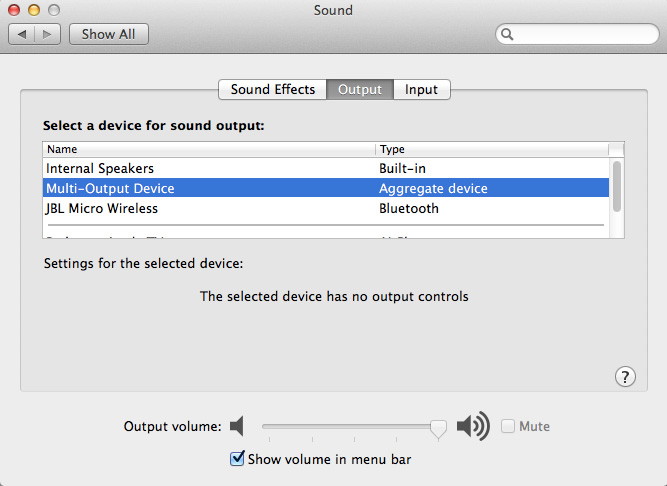
MOD-Select
I originally did this with my iMac but the screenshots in this post were created using my MacBook Air.

And that should work. The Bluetooth audio (at least with the settings I used) will have a slight delay in comparison to the system speakers. Bluetooth has a relatively short range so the practical applications of this method may be limited by obstructions within one’s home and the receiving capability of the Bluetooth device that is used.


52 responses to “Simultaneously Pushing Audio to External Speakers and Bluetooth from a Mac”

  1. Sam Raynes Avatar
    Sam Raynes

    Thanks for this! After doing this however, I’m getting a humming that’s coming from the internal Mac speakers. Any idea on how to fix that?

    1. Gwen Avatar
      Gwen

      Sam did U ever find out how to get rid of humming???
      Help!!!!

    2. Rob Avatar
      Rob

      I noticed that the humming or static does not come out of the Master Device that is chosen. the static will switch as I switch which device is the master. Sample rate did not seem to affect it at all. did you ever get an answer to this?

  2. John Avatar

    AMAZING!!!! Thx 🙂

  3. Alex Avatar
    Alex

    That’s exactly what I need, but, please, where is the “Audio Midi” setup application, in Yosemite? Thank you in advance!

    1. Michael Avatar

      On my system it’s located at Macintosh HD -> Applications -> Utilities -> Audio MIDI Setup.app

    2. Gwen Avatar
      Gwen

      Under Utilities

  4. felipe Avatar

    I have a half second delay between the speaker and my mac, any idea about how to solve it?
    cheers.

    1. Rob Avatar
      Rob

      I checked the drift correction box for the bluetooth device and don’t notice the delay.

    2. Jacob U. Hansen Avatar
      Jacob U. Hansen

      Me too.. Got a B&O A2 and A9 speaker but they do not play synchronized..like you a half second delay!

  5. Evan Avatar

    I have a bluetooth speaker playing iTunes in my shop from my iMac, problem is I’d like to have all other functions on my computer use the internal speaker, such as youtube etc, Is that possible?

  6. trevorlam2014 Avatar
    trevorlam2014

    Great, just what I wanted. Only problem is it seems like I can’t control the volume with the usual controls. Is there anyway to do this?

    1. Michael Avatar

      I’m not certain though I ended up not using this feature for very long. These days I have the iMac set to send all sound output only to a Bluetooth speaker.

      I’ve also used this method in an attempt to send audio to two Bluetooth speakers at the same time. It was able to connect to both but in practice it didn’t work – the audio dropped on both speakers constantly – I don’t know if it was a limitation of the Bluetooth radio, the OS, or both. It seemed like it simply wasn’t capable of reliably sending an audio stream to two Bluetooth devices at the same time. I wasn’t very surprised as it’s probably not a common thing that someone would have a desire to do.

    2. Delson Avatar

      Did you ever find out how to control the volume?

  7. Jonathan Lefrançois (@jrlefrancois) Avatar

    Game changer! I’ve been looking for this fix for so long. Will give it a whirl

  8. me1234 Avatar
    me1234

    I also get humming/crackling on internal speakers when external bluetooth speaker also selected. Pretty poor.

  9. Brandon Avatar
    Brandon

    Fantastic. It really feels amazing when something in this world is easy and just works.

  10. Mike Avatar
    Mike

    I have just installed a pair of bluetooth speakers on my iMac (Yosemite) because the audio out/headphones port died, after a good many years driving my original Apple external stereo speakers (a collectors item, that still work!). I found immediately that the sound quality from the bluetooth speakers was not good; choppy and crackling. After much experimenting I realised I had 3 other devices running in the bluetooth menu – keyboard, mouse and trackpad. Turning ONE off (trackpad in this instance) resulted in mush improved sound! They are good speakers (Sandstrom) 15w x 2 and I also use Boon2 to enhance the sound – now very happy.

  11. Jacob U. Hansen Avatar
    Jacob U. Hansen

    I maked it work and its crazy! but after changing to another song there is a half second delay! How can i fix that?

  12. Tomas Avatar
    Tomas

    Hi!
    Many thanks for this advice. But … unfortunately, I cannot change the volume by this new virtual device.

  13. tim Avatar
    tim

    get lots of lag I’m afraid, any idea how to sort this?

  14. Jennifer Lorenz Avatar

    Awesome!! Was able to do this within a minute.
    Thank so much!!

  15. conner murpy Avatar
    conner murpy

    My external speakers are considered “built in output” when plugged in, so I cannot select the external speakers and the built in iMac speakers for the multi-output device. Is there a way to use both of these output devices as a multi-output device?

  16. Benjamin Avatar
    Benjamin

    Didn’t work for me. I have the aggregate set up but my Mac will still only output to one device. I have aa JBL Pulse 2 bluetooth speaker and speakers plugged into the headphone jack.

  17. Rafael Cantarela Avatar

    Thank you, it was very easy and was almost exactly what I want…
    I put the output to two different bluetooth speakers (Headphone and Harman/Kardon speaker), now I’m seeking for a possibility to send the left chanel to both chanels of one device and right chanel to both chanels of another device?

    1. Lex Fradski Avatar
      Lex Fradski

      sorry for late reply. i’m thinking now about the same — want to purchase two bluetooth mono speakers and connect them together. Did your solution with two simultaneous work now? Have you tried to use aggregate device instead of multi-output to redefine channels?

      1. Rafael de Almeida Cantarela Avatar
        Rafael de Almeida Cantarela

        Hi, late reply is mine now lol
        If I remember well I couldn’t do that. Now I’m using Windows again, I’ve changed my job, so now the new company gaves me a HP Notebook. As I don’t need PC or Note for personal use, I’m not a macos user anymore.

  18. Kunto Bayu ombey Avatar
    Kunto Bayu ombey

    If you have lag or crakling, try to check the drift correction in audio midi…
    Try to change the master sound in your new profile audio agregate (multi output device) too….

    1. Shuping Ruan Avatar

      It helped. My turned out that build-in as master, drift correction checked for both to be the best.

      1. Shuping Ruan Avatar

        Increase sample rate might help too.

  19. Jon R Wilson Avatar

    Thanks, This works well on OSX 10.11.3 with a Jambox in another room–even with a bluetooth keyboard and mouse.

    Only annoyance is volume adjustment, which doesn’t work when on Multi-Output Device. I have to switch the output to just one device (Internal Speakers or Jambox), adjust the volume like normal, and then switch it back to Multi-Output Device. Works well enough, but interrupts audio in the other room.

  20. What Did I miss? Avatar
    What Did I miss?

    Didn’t work. After making an aggregate device and selecting built-in and bluetooth i get “The selected device has no output controls” when I go to system preferences sound output. I press play on itunes and the sound output automatically changes from aggregate device to only bluetooth.

  21. zagcatt Avatar
    zagcatt

    great this .. only this is that when I followed the steps above I can not alter volume via imac or my bluetooth speakers?

    1. Shuping Ruan Avatar

      If you go to the AUDIO MIDI Setup-> Sow Audio Devices. Click on Built-in output and/or your bluetooth output. It will show two bars, numbered 1 and 2, for changing volume 1.

      1. Sir_Rigo Avatar
        Sir_Rigo

        You Genius! Thnks

  22. Bruce Erlichman Avatar
    Bruce Erlichman

    Didn’t work. Using 2 OontZ Angle speakers on a Macbook Air. Bluetooth icon shows both OontZ’s as connected. Icon does not show Multi-Output Device – should it?

    Getting sound only through one speaker and very choppy at that. Preferences/Sound shows both speakers and Multi-Output Device. Speaker types are Bluetooth – Multi-Output Device type is Aggregate device.

    Only other Bluetooth device is mouse which I disconnected to no avail.
    Any thoughts?

    Bruc

  23. Mikkael Avatar
    Mikkael

    Thanks !

  24. Alberto Avatar

    Fantastic, Just works in Sierra. This Xmas buyer 3 bt speaker and they works simultaneously. Amazing!

  25. windwardqi Avatar

    Thank you! I am now able to transmit music to both my treatment rooms from the same computer 🙂 I feel so hi-tech~

  26. rusty2012 Avatar
    rusty2012

    Volume control: I couldn’t control volume through the normal keys, either. I was able to control music volume through iTunes, though. Thanks for the great tip! Feel like I can rock out again 🙂

  27. Jesse Avatar
    Jesse

    Still getting horrible buzzing in my bluetooth JBL speaker. Any help?

  28. Bobby Chase Avatar
    Bobby Chase

    WORKS GREAT THANKS

  29. Kelly Geer Avatar
    Kelly Geer

    Perfect! Now my Holiday Party is really gonna rock!

  30. paullyfitz Avatar

    Hey, thanks for this, was just looking for info on pairing my bluetooth speaker, but came across this and now I have an unexpectedly pleasant 3-speaker surround setup going 🙂
    Wanted to offer a tip for those lamenting the loss of their volume button functionality. Which is indeed mighty lamentable, verging on infuriating. I haven’t tested it much, but the tip is as follows: If you are in whatever app your music or sound is coming from, try holding Shift and hitting the up or down keys. So far I’ve tried it in Amazon Music, as well as watching Netflix in Safari. Worked brilliantly both times. I presume it would behave similarly elsewhere. Obviously not as good a hitting a single button that will globally change volume regardless of the app you’re in, but at least it spares you the need to go mousing around for a tiny volume slider.

  31. Katie Dodd Avatar
    Katie Dodd

    THANK YOU!!!!

  32. sarahcrispin Avatar

    Awesome, great post – thank you! Only shame is the bluetooth lag problem, can be minimised a little by playing with computer speaker settings 🙂

  33. Mechelle Cheng Avatar
    Mechelle Cheng

    I apologize… Still new to my new iMac which much to my beloved with the PC is being slowly lured to my beautiful new toy. I can not find this option on my iMac. I’ve open Midi Setting and it does not give me the multi-device option. What am I missing? Getting ready to buy additional speakers. Do I need to add the speakers before I have that ability? Would Bluetooth or wired speakers be recommended?

  34. Mickel Avatar

    Awesome information you provided there, however my bluetooth speaker has a delay of 0.5 seconds, so it’s really terrible to listen to it.
    Is there a way to also fix this delay?
    I read some people fixed it but they’d didn’t share how.

    Please help.

    thanks

  35. Günther Von Skrt aka Lord Cactus Avatar
    Günther Von Skrt aka Lord Cactus

    Hi guys,

    I use this method to play the drums by having headphones plugged into my Mac so I can hear songs and at the same time I’ve put it on my bluetooth sound bar so everyone can enjoy what I’m playing.

    I had a delay until I found a this :

    Check the drift correction on the bluetooth speaker your are using and not the main source. I think it was set up on my mac by default but once you correct this, everything gets perfectly timed.

    Hope this helps.

    Have a nice day and be safe

    1. Mickel Avatar
      Mickel

      how and where can I find the drift correction on the bluetooth speaker?
      Then how can I correct this?
      Currently I’m using the 3,5 jack to do this as I can’t get rid of the delay over bluetooth.

  36. Michael Ricciardi Avatar
    Michael Ricciardi

    FYI, your post is still helping people (me for example) even after 6 years plus. 5 minutes and done! TY.

  37. agoraphone Avatar
    agoraphone

    Seems the only way to fix the delay is to buy extra software to manually add delay to one source. See this post: https://medium.com/@dtinth/playing-audio-through-multiple-speakers-in-mac-os-x-d275bce96ea4

Leave a reply to me1234 Cancel reply

This site uses Akismet to reduce spam. Learn how your comment data is processed.

I’m Mike

Welcome to my blog, which I have maintained for several years, off and on, to share things that I’ve learned from numerous projects and various problem solving escapades. This is my way of giving something back to the online communities that have helped me learn more about a wide variety of topics.
