This particular solution isn’t one that I discovered, though unfortunately in the course of seeking a solution I neglected to bookmark the post in which I read it.

There can be many causes for an automatic repair loop, so this solution may not fix the problem for everyone.

While working on a laptop for some friends I encountered a problem after applying some Windows updates. On restart the system went into a repair loop, which resulted in an inability to restart into Windows.

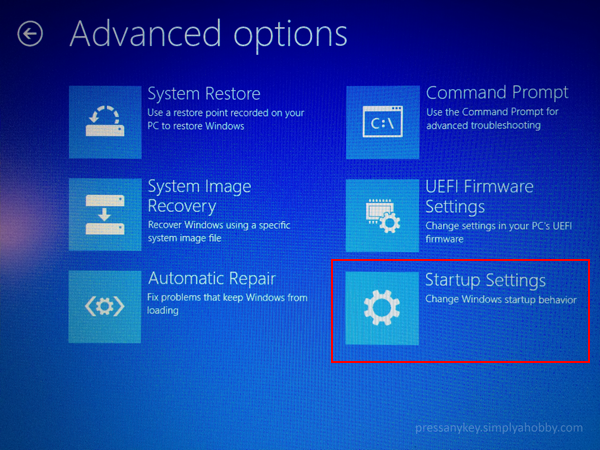
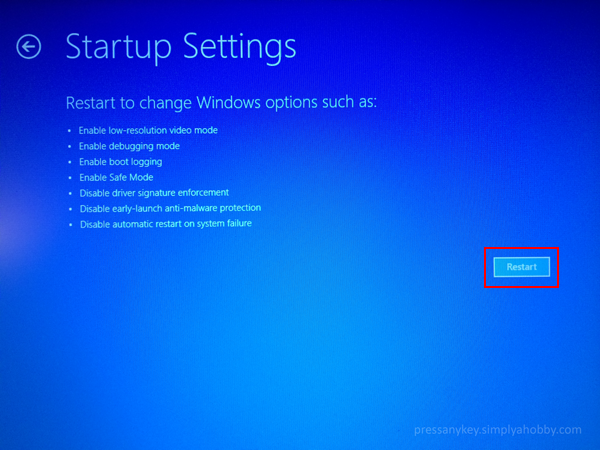
In this case the problem appears to be a Windows feature that essentially makes the OS get in its own way. The solution was to Disable Early Launch Anti-malware Protection.

Advanced-Startup-01

Advanced-Startup-02

Advanced-Startup-03

Advanced-Startup-04

Advanced-Startup-05

One response to “Resolving Windows 8/8.1 Automatic Repair Loop After Windows Updates”

  1. Emmelia Avatar
    Emmelia

    What did you do to get to that screen? I’m on a Dell and have no idea how to get past the black screen with the Dell logo where the automatic repair loop is happening.

Leave a comment

This site uses Akismet to reduce spam. Learn how your comment data is processed.

I’m Mike

Welcome to my blog, which I have maintained for several years, off and on, to share things that I’ve learned from numerous projects and various problem solving escapades. This is my way of giving something back to the online communities that have helped me learn more about a wide variety of topics.