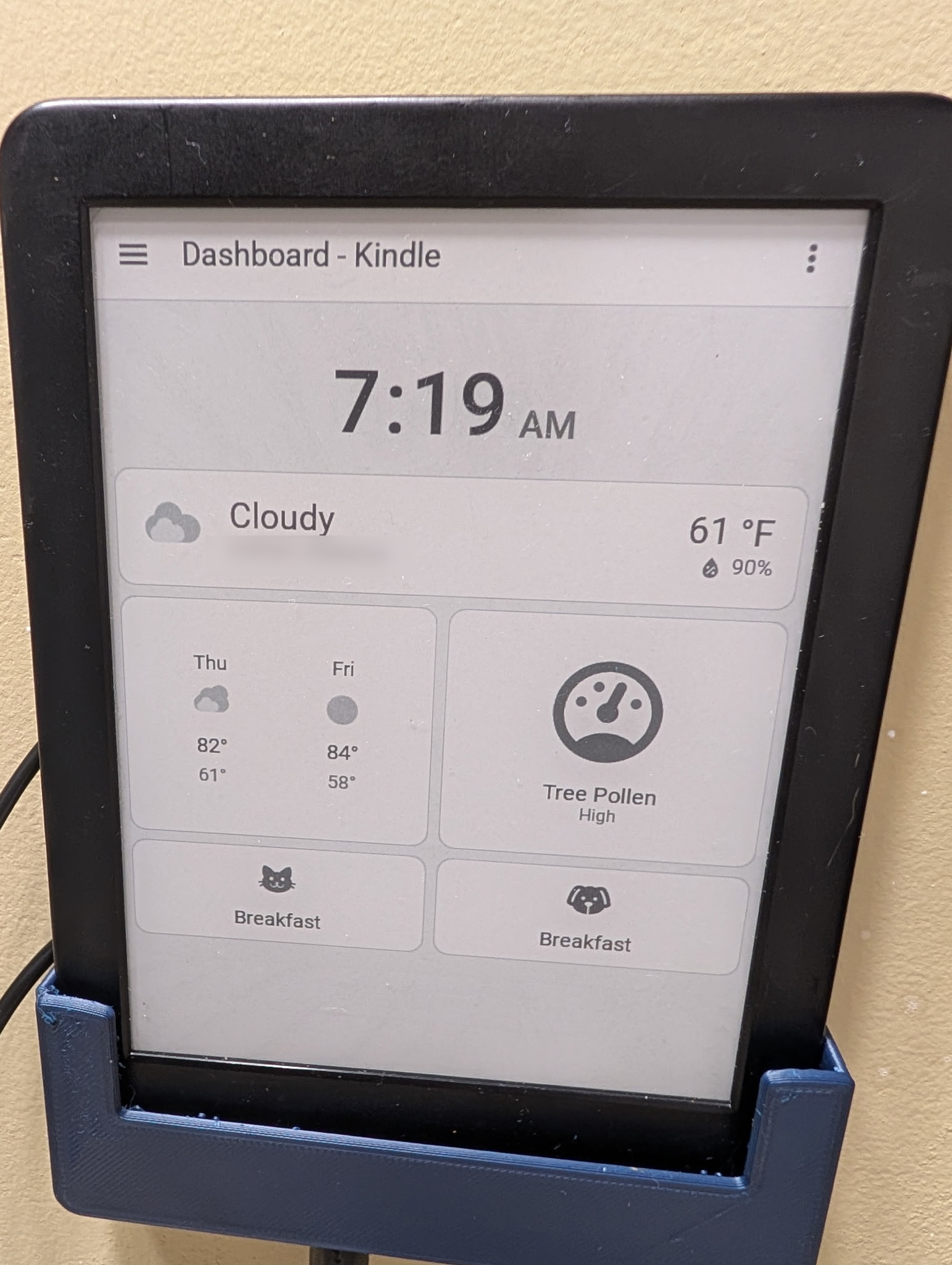
I had an older Kindle 10th Generation Basic ebook reader sitting a drawer ununsed. When I last looked into using it as a Home Assistant kiosk the device was, unfortunately, at firmware level not supported by the most recent jailbreaks. About a month ago I decided to dig it out and see if this had changed.
To my surprise, this had changed and there are exploits available to jailbreak Kindle devices running on 5.18.1 – 5.18.5.0.1, which includes my device.
There’s a much longer journey here than I will explore in this post, but the short version is that I installed AdBreak, installed and configured Home Assistant Lovelace Kindle Screensaver on my Home Assistant server, discovered that I could not install linkss or onlinescreensaver extensions to my Kindle due to hardware incompatibility (these tools did not appear to have been compiled for armhf) and event went down a path of installing and updating Alpine Linux.
Then I discovered that most of this wasn’t necessary. I could accomplish this without using the extensions or Alpine Linux but running a script directly from kterm, which was installed as part of the jailbreaking process.
Note that this script is different in how it functions as it does not override the device’s screensaver, thus it needs to remain awake to function properly.
I created the script on a Windows laptop and then transferred it via USB direclty to the Kindle. If working from a non-linux os like I was, ensure that you are using the correct file encoding/EOL settings in your editor. In Notepad ++, I realized this after the fact and had to change the EOL Conversion setting under the Edit menu to Unix LF.
This script has some parameters at the top of the file that you can modify. I’ve since updated the SET_BRIGHTNESS value to a higher value. I initially started out with a 5 minute refresh but I reduced it to 1 minute since the dashboard this pulls has a clock displayed on it. There are some tricks it does to ensure the device itself doesn’t fall asleep and to surpress errors that don’t impact the functionality of the script.
Note that you would need to replace the IMAGE_URL value with the URL to your Home Assistant Lovelace Kindle Screensaver dashboard URL.
I went through several iterations of this script before arriving at this version and so far it seems to be very stable. If the dashboard appears to not be updating then check to see if your Kindle is still awake.
There is one potential issue to be aware of if you have the same device and it doesn’t work. It is possible that I had to install some packages to my device via kterm but neglected to make notes on those steps.
#!/bin/sh# --- Configuration Variables ---SET_BRIGHTNESS=1 IMAGE_URL="http://XXX.XXX.XXX.XXX:5205/1" INTERVAL_MINUTES=1 LOCAL_FILE="/tmp/ha_dashboard.png"# This file flag prevents the screensaver on many Kindle modelsKEEP_AWAKE_FLAG="/mnt/us/TESTD_PREVENT_SCREENSAVER"# --- Absolute Binary Paths ---WGET_BIN="/usr/bin/wget"SLEEP_BIN="/bin/sleep"EIPS_BIN="/usr/sbin/eips"DMESG_BIN="/bin/dmesg"# --- 1. Cleanup Function (Trap) ---# This runs when the script is killed or interruptedcleanup() { echo "Cleaning up..." rm -f "$KEEP_AWAKE_FLAG" exit}trap cleanup SIGINT SIGTERM EXIT# --- 2. Suppress Kernel Messages on Screen ---if [ -x "$DMESG_BIN" ]; then $DMESG_BIN -n 1else echo "1 1 1 1" > /proc/sys/kernel/printk 2>/dev/nullfi# --- 3. Disable Sleep Mode ---touch "$KEEP_AWAKE_FLAG"# --- 4. Apply Brightness ---BACKLIGHT_FILE=$(ls /sys/class/backlight/*/brightness 2>/dev/null | head -n 1)if [ -f "$BACKLIGHT_FILE" ]; then echo "$SET_BRIGHTNESS" > "$BACKLIGHT_FILE" 2>/dev/nullfi# Convert minutes to secondsSLEEP_SECONDS=$((INTERVAL_MINUTES * 60))# 5. Initial Clear$EIPS_BIN -f -c 2>/dev/nullwhile true; do # 6. Download with Headers and Timeout $WGET_BIN -q \ --timeout=15 \ --tries=2 \ --header="Cache-Control: no-cache, no-store, must-revalidate" \ --header="Pragma: no-cache" \ --header="Expires: 0" \ -O "$LOCAL_FILE" "$IMAGE_URL" # 7. Display & Refresh if [ -f "$LOCAL_FILE" ]; then $EIPS_BIN -g "$LOCAL_FILE" >/dev/null 2>&1 if [ -e /sys/class/graphics/fb0/update_mode ]; then echo "1" > /sys/class/graphics/fb0/update_mode 2>/dev/null else $EIPS_BIN -f >/dev/null 2>&1 fi fi # 8. Sleep $SLEEP_BIN "$SLEEP_SECONDS"done



Leave a comment