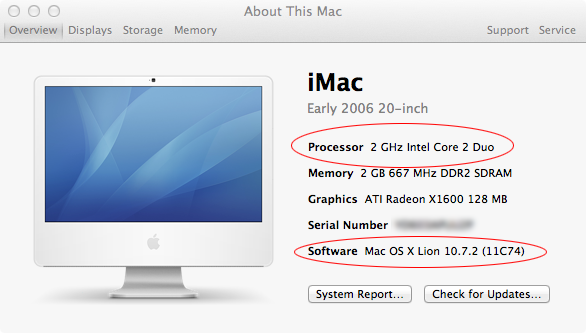
Not very long ago I added a post explaining why I didn’t think it would be worth upgrading the processor in my Core Duo iMac and also why I wasn’t in a hurry to upgrade to Lion. Well, as often happens, I wasn’t satisfied with those conclusions and eventually decided that the benefits outweighed the effort involved.
This post won’t include step-by-step instructions – just some general information and maybe a few tips. However, I do think it was indeed worth upgrading my iMac to be able to run Lion.
I managed to find a used Intel T7200 (Socket M) processor on eBay for $45. Installation was a chore, but not impossible. In fact, after you’ve done it one time you won’t have any trouble doing it again. My iMac motherboard didn’t match the one in the Mac|Life upgrade guide, but the process was still nearly identical.
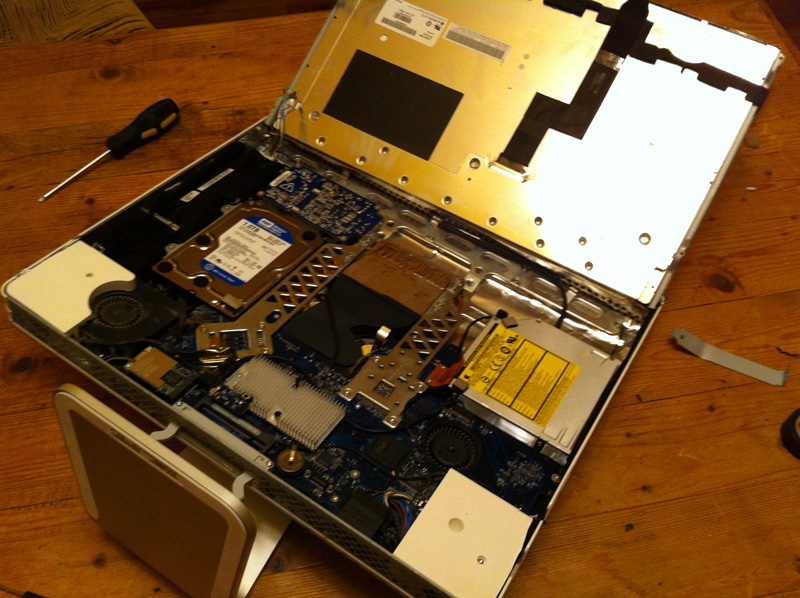
Unfortunately, I seem to have damaged the Airport. I’m not certain which part is bad (the card or the antenna), but I suspect it’s because I did not fully remove the LCD and that the antenna may have been cut or crimped. To deal with this I bought an inexpensive USB wireless N adapter.
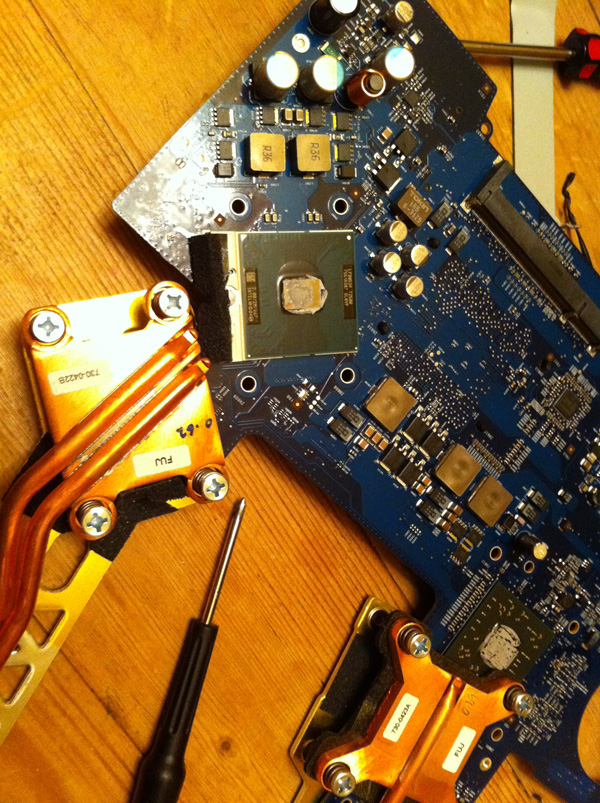
For a new processor you’ll need to add thermal paste. However, I didn’t. My processor was used so there was still thermal paste on the replacement processor as well as some left on the heatsink. Sure, it looks old and dried but I think it becomes more fluid once the processor heats up. So far, my CPU temps are in the normal ranges (observed being between 110 F – 150 F).
I had to wait several days before attempting to upgrade the iMac from Snow Leopard to Lion. Fortunately, I already had options. My wife’s laptop had been upgraded from Snow Leopard to Lion, so using her laptop’s Lion recovery data was an option for me. I tried to work with a USB recovery image, but in the end it seems that the only good way to upgrade an unsupported Core 2 Duo Mac is to install Lion using a supported Mac and Target Disk Mode.
So… I set my iMac to boot into Target Disk Mode (System Preferences – Startup Disk, though holding “T” on boot should do the same) and then I started my wife’s Lion laptop from it’s recovery partition. After that, it was just a matter of having the Lion installer use my iMac’s drive for the installation.
The process took several hours. Much of the time was taken by the installer. It seems that before installing it checks to see if the latest Lion installer is available. If not, it downloads the new version. This actually saved me a few steps. Instead of having to install the Lion 10.7.1 and 10.7.2 updates later (and having to delete the plist again after 10.7.2) it installed 10.7.2 to begin with.
After Lion was installed I connected to the iMac hard drive via Target Disk Mode from my wife’s laptop and deleted the System/Library/CoreServices/PlatformSupport.plist file (from my iMac drive). Then I restarted the system and it seems to be working fine aside from a few, rare graphic glitches I had noticed earlier, which seem to be related to certain animations.
Overall, I think it was worth the effort. The system seems to be running fine.
Upgrade Your iMac to a Core 2 Duo Processor (Mac|Life)
Lion on 2006 Mini with Core2Duo CPU upgrade? (MacRumors)
Updated 10/22/2011: Today I attempted to rip a Blu-Ray movie and found the process to be much shorter than it was with the Core Duo processor. The rip from disc only took about an hour and a half (previously about 10 hours). The conversion process looks like it will require about 5-6 hours (instead of 10-12 hours).
Updated 10/26/2011: So far so good. The only other quirk I noticed was that I couldn’t open my iTunes library right away. It seems that in Snow Leopard I had iTunes 10.5 installed but when Lion installed it replaced it with a slightly older version of iTunes (the libraries weren’t compatible). The solution was simple – I only had to download iTunes 10.5 and install it. After that everything worked fine.
Prior to installing Lion I purchased and installed Quicken Essentials for Mac so I could import my data from Quicken 2006 (PowerPC only, so it won’t work in Lion). Like many others, I prefer Quicken 2006, but I didn’t need all of the features and I didn’t care to go with a different software company (at least not yet). I purchased Quicken Essentials at a discount (about half-price) and imported my data. I do have investments and loans but at the end of the day I only use Quicken to balance my checking account and budget for the next month. It seems to handle these basic tasks just fine. Note that you must install Quicken Essentials and import from the older version of Quicken BEFORE upgrading to Lion (otherwise you’ll have to boot from a Snow Leopard disk).
Updated 11/12/2011: I had a link to the discount for Quicken Essentials but it’s no longer available.



 Press Any Key
Leave a reply to Recent Updates « Press Any Key Cancel reply